Currently the Mailody crew is working to rewrite Mailody using the Akonadi backend. Akonadi is a cross-desktop
PIM Storage Service. It basically acts like a cache or proxy if you like.
On the one hand, you can feed things into it. This is done by agents or resources. This can be a simple Maildir resource, Mailody is developing an IMAP library resource, NNTP-resource, etc. etc. On the other hand it provides ways to get the data to the applications that want to use it. Not only an addressbook or mail client, but also it makes it possible for strigi to search it and recently I saw soneone interested in making a SyncML connection.
We (Mailody) were surprised how simple it is to display the data in Akonadi. How the data gets into Akonadi will be out of scope for this article, but I wil get back to that later. For now, I just assume the data is in Akonadi, for example by the Maildir resource, which simply reads the mails you have in a Maildir.
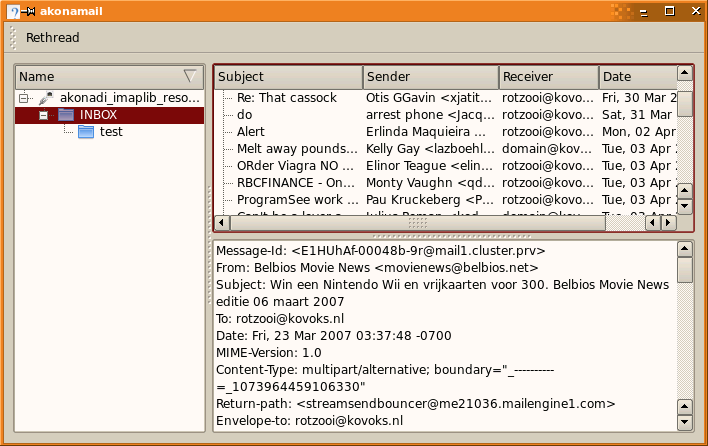
We will now show how to write a mail client, or rather a mail reader to keep it simple. First, let's see what we need for this basic client. If we look at a traditional mail client, it is usually build up out of three parts: we need an overview of the folders on the left, the headers at the top right and the display of messages happens on the bottom right.
The listing of the folders. A folder is represented in Akonadi by a
Collection. The Collections hold the name to display, an internal value so you can map it in your resource and things like the amount of unread messages. Akonadi provides funtions to retrieve all those collection from a certain resource, but Akonadi goes further, it also provides a ready to use models and views to use.
So here we go with the mainwidget:
{
QHBoxLayout *layout = new QHBoxLayout( this );
QSplitter *splitter = new QSplitter( Qt::Horizontal, this );
layout->addWidget( splitter );
mCollectionList = new
Akonadi::CollectionView();
connect( mCollectionList, SIGNAL(clicked(QModelIndex)), SLOT(collectionActivated(QModelIndex)) );
splitter->addWidget( mCollectionList );
mCollectionModel = new
Akonadi::CollectionModel( this );
mCollectionProxyModel = new
Akonadi::CollectionFilterProxyModel( this );
mCollectionProxyModel->setSourceModel( mCollectionModel );
mCollectionList->setModel( mCollectionProxyModel );
}
That's it. Now it will show the collections on the left side. If you want to see columns for unread messages and a total count, use the
Akonadi::MessageCollectionModel instead. The proxy in above code is needed because Akonadi can hold different types of collection, it can also hold a bunch of vcards for example. We don't want to see those in the mail client (at least not here), we ideally we want to add a m_folderProxyModel->addMimeType("message/rfc822"); to the code.
So, next up is the headerlist. Akonadi provides the model for this as well. This model can be applied to the standard QTtreeView to show the headers. But you obviously want to have the messages displayed threaded, so you can easily spot which message is a reply to another. Here we go with the headerlist:
QSplitter *rightSplitter = new QSplitter( Qt::Vertical, this );
splitter->addWidget( rightSplitter );
mMessageList = new QTreeView( this );
mMessageList->setDragEnabled( true );
mMessageList->setSelectionMode( QAbstractItemView::ExtendedSelection );
connect( mMessageList, SIGNAL(clicked(QModelIndex)),
SLOT(itemActivated(QModelIndex)) );
rightSplitter->addWidget( mMessageList );
mMessageModel = new
Akonadi::MessageModel( this );
mMessageProxyModel = new
Akonadi::MessageThreaderProxyModel( this );
mMessageProxyModel->setSourceModel( mMessageModel );
mMessageList->setModel( mMessageProxyModel );
For the display of messages, we will keep it simple. You don't expect this to be a finished mail client, right?
mMessageView = new QTextEdit( this );
rightSplitter->addWidget( mMessageView );
So, that are the basic display items. Of course we need to implement the two slots. CollectionActivated makes sure the correct headers are shown when you click on a Collection. Remember Collection is the term for a folder in our case.
mCurrentCollectionId = mCollectionList->model()->data( index,
CollectionModel::CollectionIdRole ).toInt();
mMessageModel->setCollection( Collection( mCurrentCollectionId ) );
The other slot has to show the correct message when you click on a header. In fact, this creates a KJob to fetch the message from Akonadi. It can happen that Akonadi does not yet have the complete message. In that case it will ask the resource for the missing part and will emit the itemFetchDone after that.
DataReference ref = mMessageModel->referenceForIndex(
mMessageProxyModel->mapToSource( index ) );
ItemFetchJob *job = new ItemFetchJob( ref, this );
job->addFetchPart( Item::PartBody );
connect( job, SIGNAL( result(KJob*) ), SLOT( itemFetchDone(KJob*) ) );
job->start();
You might be confused by the
DataReference. A message is represented by an
Akonadi::Item. That Item holds the actual data, for example via the payload functions. To reference a certain Item in the Collection a DataReference is used, basically a unique id. In our case you can use a mailbox name in combination with the message-id or uid as a unique key.
When the data arrives, we can display it to the user:
ItemFetchJob *fetch = static_cast<ItemFetchJob*>( job );
if ( job->error() ) {
qWarning() << "Mail fetch failed: " << job->errorString();
} else if ( fetch->items().isEmpty() ) {
qWarning() << "No mail found!";
} else {
const Item item = fetch->items().first();
mMessageView->setPlainText( item.part( Item::PartBody ) );
}
That is it. Now you have your basic mail reader. I bet it took less than 10 minutes. You can understand that rewriting an existing mail client to use Akonadi is a bit more work. But it is fun, as it's deleting most of your own work (isn't that the real meaning of 'eating your children'??), and replacing it by Akonadi elements.
Of course when you have this foundation you want to extend it with more features. But you can easily do that, for example by writing the delegates. I hope this "how to" inspires you to write your own mail client, or to join the Mailody or Akonadi team.
Note: the above sections of code come from the mail client which is part of Akonadi. You can find it in
KDE SVN. It is called "Akonamail", and is written by Bruno Virlet.