 KDE Commit-Digest
Dolphin was released as KDE 3 application around June 2006. It is not intended as competitor to Konqueror, as Konqueror is a lot more than just a file manager. The focus of Dolphin is primarily on being a great file manager, which allows us to optimise the user interface for this specific task.
Currently Dolphin is being ported to Qt4 and the KDE 4 environment, with special attention being given to converting and optimising the file item views using Qt4's Interview, which is a challenging task. The version in SVN is not really usable at the moment because of the Qt4/KDE 4 port. The focus for Dolphin will be on improving the navigation bar, introducing pluggable sidebars and providing better visual feedback for drag & drop operations.
I think it is important to mention, that Dolphin should NOT replace the Konqueror file manager. Dolphin is currently just a playground for testing some usability ideas and also for testing the file related parts of the KDE 4 libraries. If everything goes well, maybe some parts like the Dolphin navigation bar might find their way to kdelibs, so that it can be used by other applications or in the file open/close dialog. So before a discussion is started at dot.kde.org about Dolphin vs. the Konqueror file manager: Dolphin is just an additional option and is not meant to replace Konqueror :-)
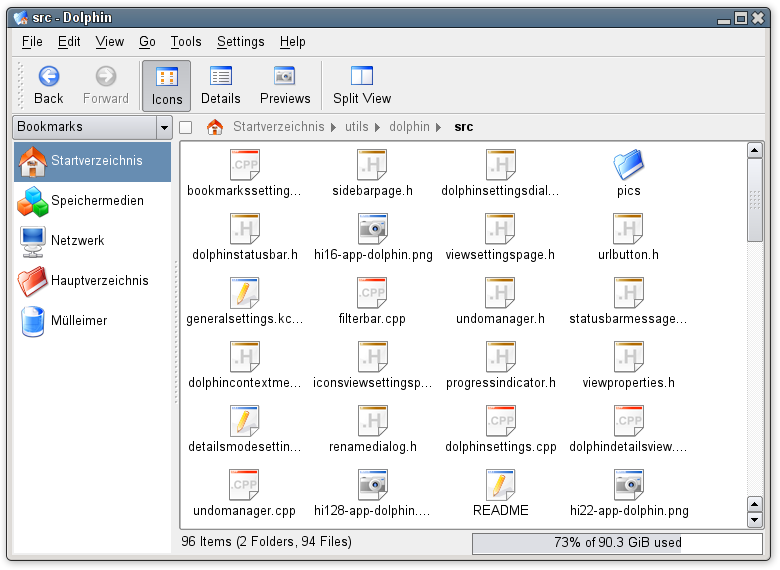
Dolphin currently does not look too impressive visually, but nethertheless, here is a screenshot of the KDE 4 version of Dolphin (in SVN at /trunk/playground/utils/dolphin/). It shows the prototype of a sidebar which is not yet available in the KDE 3 version of Dolphin.
Issue 34
26th November 2006 by Danny AllenThis Week...
Dolphin, an alternative file manager, is imported into KDE SVN. Work on session management in Kontact becomes visible with the implementation of state remembering for tabs in aKregator. Mailody gets a better SMTP implementation, with authentication support. Many functionality improvements in Okular. An experimental generic API for integration of more online music store services (following the example of the Magnatune implementation) is proposed and developed in Amarok. Continued speed and memory optimisations in KOffice and KDE 4 (via kdelibs).
A new file manager application moulded by experimental usability, Dolphin, was finally imported into KDE SVN this week. Peter Penz, the lead developer, briefly introduces Dolphin:
Josef Spillner, the maintainer of a KDE development monitoring tool, Commitfilter, reports on a recent update to the web interface:
The Commitfilter software was updated to version 0.9.1 today.
Though no significant new functionality has been added, a lot of maintenance changes were due. Among others, the web interface can now be styled (a KDE-like one will be added soon). New features will be added in the next release - filtering by regular expression, deleting accounts, etc.
The instance which runs on http://commitfilter.kde.org/ has moved to new.kstuff.org which is a OSU-OSL sponsored server. This allows us the luxury of a local installation of KDE SVN (all released KDE modules, possibly more on request) which is updated daily and makes browsing the modules so much faster when compared to the WebSVN browser!
I would also like to point out that we're looking for more people to join the KDE Services Team since hosting services eats a lot of time and is better shared among some people. Find out more here.
Finally, congrats to the Amarok people for being the #1 most popular request among Commitfilter users!
Though no significant new functionality has been added, a lot of maintenance changes were due. Among others, the web interface can now be styled (a KDE-like one will be added soon). New features will be added in the next release - filtering by regular expression, deleting accounts, etc.
The instance which runs on http://commitfilter.kde.org/ has moved to new.kstuff.org which is a OSU-OSL sponsored server. This allows us the luxury of a local installation of KDE SVN (all released KDE modules, possibly more on request) which is updated daily and makes browsing the modules so much faster when compared to the WebSVN browser!
I would also like to point out that we're looking for more people to join the KDE Services Team since hosting services eats a lot of time and is better shared among some people. Find out more here.
Finally, congrats to the Amarok people for being the #1 most popular request among Commitfilter users!
A message sent to the kde-accessibility mailing list caught my eye this week, as a great illustration of the rewards all users gain through accessibility foresight, and not just those with more traditionally-recognised disabilities. Sami Liedes simply titles his message: "Thanks :)":
I wanted to say a big thanks to the folks who work to make KDE accessible. Having recently been in an accident that disabled my primary hand for some 1.5 months, I was delighted to see how good KDE Accessibility is. Sticky keys is of course basic stuff, but it makes certain things a lot easier for me. Above all I was delighted that my browser of choice when I'm healthy, Konqueror, implements what I consider superior accessibility features.
In Konqueror, at least the access keys are really nice, and Firefox (which I use for a very few sites that do not work well under Konqueror) for example doesn't seem to have those.
There are still some things that I haven't figured out how to use with keyboard, like KOrganizer. Maybe I should start to file bugs against them (I already have filed a number of accessibility-related bugs against Konqueror). But mostly I can just go on using my computer with one hand almost as easily as before.
So thank you :)
In Konqueror, at least the access keys are really nice, and Firefox (which I use for a very few sites that do not work well under Konqueror) for example doesn't seem to have those.
There are still some things that I haven't figured out how to use with keyboard, like KOrganizer. Maybe I should start to file bugs against them (I already have filed a number of accessibility-related bugs against Konqueror). But mostly I can just go on using my computer with one hand almost as easily as before.
So thank you :)
Statistics
| Commits | 1840 by 206 developers, 5586 lines modified, 1123 new files |
| Open Bugs | 12959 |
| Open Wishes | 11926 |
| Bugs Opened | 280 in the last 7 days |
| Bugs Closed | 323 in the last 7 days |
Commit Summary
| Module | Commits |
| /trunk/KDE |
393
|
| /trunk/l10n |
240
|
| /trunk/extragear |
235
|
| /trunk/playground |
212
|
| /trunk/koffice |
201
|
| /branches/stable |
134
|
| /branches/KDE |
104
|
| /branches/work |
88
|
| /trunk/www |
67
|
| /branches/kdevelop |
45
|
| Lines | Developer | Commits |
|
1569
|
Laurent Montel |
88
|
|
224
|
Clarence Dang |
88
|
|
87
|
David Faure |
72
|
|
150
|
Gilles Caulier |
72
|
|
24
|
David Jarvie |
59
|
|
103
|
Luboš Luňák |
41
|
|
99
|
Andreas Pakulat |
41
|
|
55
|
Stephan Kulow |
39
|
|
83
|
Thomas Zander |
38
|
|
99
|
Stefan Nikolaus |
37
|
Internationalization (i18n) Status
| Language | Percentage Complete |
| Danish (da) |
99.99%
|
| Portuguese (pt) |
99.99%
|
| Swedish (sv) |
99.96%
|
| Spanish (es) |
97.42%
|
| Dutch (nl) |
96.78%
|
| Greek (el) |
95.7%
|
| Italian (it) |
93.81%
|
| German (de) |
93.54%
|
| French (fr) |
93.1%
|
| Estonian (et) |
92.42%
|
Bug Killers and Buzz
| Person | Bugs Closed |
| Andreas Pakulat |
48
|
| Philip Rodrigues |
47
|
| Sebastian Trueg |
32
|
| Bram Schoenmakers |
31
|
| Jonathan Marten |
24
|
| Martin Koller |
20
|
| Seb Ruiz |
16
|
| Mark Kretschmann |
15
|
| Christoph Burger-Scheidlin |
15
|
| Thomas Zander |
12
|
| Program | Buzz |
| Amarok |
5760
|
| Kate |
3090
|
| K3B |
2900
|
| KMail |
2860
|
| Kopete |
2680
|
| KDevelop |
2186
|
| Kat |
1906
|
| Kontact |
1506
|
| digiKam |
1492
|
| Kicker |
1348
|
| Person | Buzz |
| David Faure |
992
|
| Adriaan de Groot |
861
|
| Stephan Kulow |
756
|
| Zack Rusin |
704
|
| Waldo Bastian |
542
|
| George Staikos |
352
|
| Aaron J. Seigo |
350
|
| Jonathan Riddell |
341
|
| Albert Astals Cid |
334
|
| Stephan Binner |
273
|
Commit Countries
Commit Demographics
Sex
Age
Contents
| Bug Fixes | Features | Optimization | Security | Other | |
|---|---|---|---|---|---|
Accessibility | |||||
Development Tools | [] | [] | [] | ||
Educational | [] | [] | |||
Graphics | [] | [] | |||
KDE Base | [] | [] | [] | ||
KDE-PIM | [] | [] | |||
Office | [] | [] | [] | [] | |
Konqueror | |||||
Multimedia | [] | [] | [] | ||
Networking Tools | [] | [] | |||
User Interface | [] | ||||
Utilities | [] | [] | |||
Games | [] | [] | |||
Other | [] |
There are 94 selections this week
Bug Fixes
Development Tools
Stephan Johach committed changes in /branches/KDE/3.5/kdesdk/kbabel:
Andreas Pakulat committed changes in /branches/kdevelop/3.4/buildtools/qmake/scope.cpp:
Really fix replacing Shell variables, we need to add () around not {}
Educational
Joseph Kerian committed changes in /trunk/KDE/kdeedu/kiten/radselect:
There we go... found the two bugs that were preventing radselect from working. Radical selection is now limited by the remaining possibilities, and the remaining kanji possibilities are displayed as well. Next up, making stroke count work, and making some ui decisions.
Diffs: 1, 2, 3, 4 Revision 606048
Albert Astals Cid committed changes in /trunk/KDE/kdeedu/kgeography/data:
Newer hungary map with more correct inner divisions.
Thanks to Laurent Garnier for the map itself.
Thanks to Maria Cid Tobal for improving its look. Mom rules!
Diffs: 1, 2 Revision 606787

Graphics
Aurélien Gâteau committed changes in /trunk/extragear/graphics/gwenview:
Instead of "re-saving" the image, do a copy of the data if possible.
Gilles Caulier committed changes in /trunk/extragear/graphics/digikam/digikam/imagepreviewwidget.cpp:
digikam from trunk : fix huge memory corruption relevant of a wrong deletion of data shared between preview kio-slave and digiKam.
Without this fix, digiKam is unstable with unsupported/broken pictures to show. It can crash everywhere with a non suitable backtrace.
I have working hard to find this problem.
I would to thanks again and again valgrind team who have provided a great debuging tool.
Diffs: 1 Revision 606923
Aurélien Gâteau committed changes in /trunk/extragear/libs/kipi-plugins/batchprocessimages/batchprocessimagesdialog:
Replaced UploadWidget with a KURLRequester
KDE Base
John Tapsell committed changes in /trunk/KDE/kdebase/workspace/ksysguard/gui/SensorDisplayLib:
Boudewijn Rempt committed changes in /trunk/KDE/kdelibs/kio/kfile/kfilefiltercombo.cpp:
Sometimes, with a messed up configuration (which is, after all, a real-world phenomenon), type is 0, and your application will crash when you try to open a file. This patch skips the faulty mime types.
Diffs: 1 Revision 607349
KDE-PIM
Jonathan Marten committed changes in /branches/work/kdepim-3.5.5+/kmail:
Apparently no objections, so...
Some changes to make menubar and popup menus more consistent (but still some way to go):
* Menubar - Message has same "Mark Thread" submenu as popup
* All popups with "Print", "Save" and "Save Attachments" in consistent order
* Message window popup (when selected text) has same "Reply" menu as preview popup
* Menubar - Folder - Mailing List Management has "..."
* Folder list popup has "Empty" and "Delete" in consistent order
Bram Schoenmakers committed changes in /branches/work/kdepim-3.5.5+/knotes/knote.cpp:
Apps should never crash, no matter how rotten your installation may be. This commit dodges cases when the *.rc is not found.
Diffs: 1 Revision 607009
Office
David Faure committed changes in /branches/koffice/1.6/koffice/kword/KWDocument.cpp:
Write out the "office:font-face-decls" into the styles.xml as well (not only content.xml) so that OOo accepts to load the fonts that we are specifying
Multimedia
Mark Kretschmann committed changes in /trunk/extragear/multimedia/amarok/src/statusbar/statusbar.cpp:
Disable "remaining" time label for streams.
Christian Esken committed changes in /trunk/KDE/kdemultimedia/kmix:
Make ALSA polling work again.
Clean up the master-device code.
KMix icon reflects volume change now (KDE4).
Sebastian Trueg committed changes in /trunk/extragear/multimedia/k3b:
* Audio project not modified after loading anymore (this was caused by stupid QListViewItem::paintCell which actually calls setText,
apperantly to initialize the column info.)
* Fixed K3bMixedDoc::isModified
* Made the konqueror service menus configurable (i.e. one can disable them)
* Added a first run dialog which asks if the konqi service menus should be enabled or not.
Networking Tools
Stefan Winter committed changes in /branches/KDE/3.5/kdenetwork/wifi/status.cpp:
correcting 5 GHz channel <:-> frequency mappings
thanks to LANCOM Systems for gratiously providing me with a 11a Access Point to try stuff out
no need to forward-port, KDE4 uses iwstats mapping and no static hard-coded tables
I wonder if there are 11a bands between 5.32 and 5.5 GHz
Diffs: 1 Revision 607621
Joris Guisson committed changes in /trunk/extragear/network/ktorrent/libktorrent/torrent:
Fixed bug which resulted in the setting of the wrong chunk priority when not all files of a torrent were selected. This resulted in the torrent being at 100 %, while not all files where at 100 %.
Other
Benoît Jacob committed changes in /trunk/kdesupport/eigen:
Features
Development Tools
Hugo Parente Lima committed changes in /trunk/playground/devtools/dbmodeler:
Hugo Parente Lima committed changes in /trunk/playground/devtools/dbmodeler:
- Regions can be resized (undo/redo needed, but I need sleep now).
- Regions can be edited (change color and name).
- Idiot debug text removed from diagram.cpp
- Added two command classes to region (resize and modify).
- Some cleanup in DiagramScene.
- Fixed x-index for tables, regions and relations.
Educational
Maurizio Paolini committed changes in /branches/kig/post-kde-3.5/kig:
added construction of a conic arc by 5 points.
Diffs: 1, 2, 3, 4 Revision 606473
Anne-Marie Mahfouf committed changes in /branches/KDE/3.5/kdeedu/ktouch:
Carsten Niehaus committed changes in /trunk/KDE/kdeedu/kalzium/src:
* Very first version of the new KPart-based molecularviewer
Diffs: 1, 2, 3 Revision 607592
Andreas Nicolai committed changes in /trunk/KDE/kdeedu/ktouch:
Graphics
Pino Toscano committed changes in /trunk/playground/graphics/okular/ui:
Tobias Koenig committed changes in /trunk/playground/graphics/okular:
Add the following functionality:
* Bring QPixmap* back to make Albert happy ;)
* Store only one QPixmap per page/size and rotate it directly
* Rotate ObjectRects (boundary)
* Rotate Annotations (point coordinates)
* Don't reload pixmaps, ObjectRects and annotations on rotation
Gilles Caulier committed changes in /trunk/extragear/libs/kipi-plugins/metadataedit:
kipi-plugins from trunk : MetadataEdit : new option to set Comments to a group of pictures. This tool will set the same comments to all selected pictures from host application. You can sync IPTC/EXIF/JFIF comments at the same time.
A fresh screenshot :
<a href="/issues/2006-11-26/files/KipipluginBatchCommentsEditor.png">http://digikam3rdparty.free.fr/Screenshots/KipipluginBatchCommentsEditor.png</a>;
Diffs: 1, 2, 3, 4 Revision 606387
Pino Toscano committed changes in /trunk/playground/graphics/okular/generators/djvu:
Pino Toscano committed changes in /trunk/playground/graphics/okular/ui:
Smootly move the viewer area to the annotation when an annotation item in the review tab is double-clicked.
Tobias Koenig committed changes in /trunk/playground/graphics/okular/generators/ooo:
Improved support for href links, the calculation of the bounding rect is correct now.
Diffs: 1, 2, 3 Revision 607189
Barth Netterfield committed changes in /trunk/extragear/graphics/kst/src:
A few minor ui changes written on TerraBus rides over the Ross Ice Shelf....
1) change the colour of the change file and change range icon data line
to provide slighly better visual clues
2) Make changefiledialog and changnpts dialogs into Apply/OK/Cancel
dialogs rather than Apply/close dialogs.
3) Double clicking on a curve in a 2d plot now opens the curve dialog, not the curve's provider... (the previous behavior was inconsistent and confusing, even for me, who defined it in the first place...)


Tobias Koenig committed changes in /trunk/playground/graphics/okular/core:
Add support of transformation (rotation) of TextPages
Diffs: 1, 2, 3 Revision 607271
Gilles Caulier committed changes in /trunk/extragear/graphics/digikam/data:


Pino Toscano committed changes in /trunk/playground/graphics/okular:
KDE Base
Jos van den Oever committed changes in /trunk/playground/base/strigi/src/searchclient:
Jos van den Oever committed changes in /trunk/playground/base/strigi/src/searchclient/qtdbus:
Luboš Luňák committed changes in /branches/work/kwin_composite:
Torsten Rahn committed changes in /trunk/playground/base/marble/data/flags:


John Tapsell committed changes in /trunk/KDE/kdebase/workspace/ksysguard/gui/SensorDisplayLib:
Torsten Rahn committed changes in /trunk/playground/base/marble/data/flags:
Created a python script that downloads all the flags of those countries for which an ISO 3166 code exists from Wikipedia. Compared to openclipart and the sodipodi website Wikipedia seems to have the best quality in terms of colors and the most complete collection of public domain flags.


Luboš Luňák committed changes in /branches/work/kwin_composite:
Torsten Rahn committed changes in /trunk/playground/base/marble/src:
Ben van Klinken committed changes in /trunk/playground/base/strigi/src/streams:
new gzipcompressstream. not finalised yet though, because i dont think we're writing gzip compatible streams. need to do more work on this
Diffs: 1, 2 Revision 607814
Ben van Klinken committed changes in /trunk/playground/base/strigi/src/streamindexer:
new windows ifilters analyzer. would be nice if it could handle streams, but for now it writes to a tempfile
Diffs: 1, 2, 3 Revision 607818
KDE-PIM
Allen Winter committed changes in /branches/KDE/3.5/kdepim/kontact:
Jonathan Marten committed changes in /branches/work/kdepim-3.5.5+/kmail:
Add keyboard shortcut Ctrl+S for "Save As" action in reader window
Tom Albers committed changes in /trunk/playground/pim/mailody/src/composer.cpp:
Give a warning when the size of the attachments are above 2MB.
Diffs: 1 Revision 607381
Frank Osterfeld committed changes in /branches/KDE/3.5/kdepim/akregator:
add session management for browser tabs. Patch by Carsten Pfeiffer.
Diffs: 1, 2, 3, 4 Revision 607497
Tom Albers committed changes in /trunk/playground/pim/mailody:
Tom Albers committed changes in /trunk/playground/pim/mailody/src:
Support for Authentication for SMTP.
Office
Thomas Zander committed changes in /trunk/koffice:
* Add all types of borders that ODF and KWord 1.x support.
In KWord 1.x we support borders with dotted lines and dash-dot etc. Which is not supported by ODF (because its not supported by XSL). Add support for that in styles anyway.
* Test for and implement the spacing results of using borders and insets in text layouting
Diffs: 1, 2, 3, 4 Revision 606169
Stefan Nikolaus committed changes in /trunk/koffice/kspread:
Stefan Nikolaus committed changes in /trunk/koffice/kspread:
Thomas Zander committed changes in /trunk/koffice:
Dag Andersen committed changes in /trunk/koffice/kplato:
Stefan Nikolaus committed changes in /trunk/koffice/kspread:
Selection
Select All
Peter Simonsson committed changes in /trunk/koffice/kivio/src/part:
* Set the unit in the rulers and the geometry palette
* Default to cm or inches depending on the locale's measure system
* Fix enabling/disabling of the geometry palette
Diffs: 1, 2, 3, 4 Revision 606666
Thomas Zander committed changes in /trunk/koffice/libs/flake:
New feature;
Instead of just allowing a shape to be scaled down to be very small, allow scaling to be negative which means that the shape will show mirrored.
Diffs: 1, 2 Revision 607389
Multimedia
Sebastian Trueg committed changes in /trunk/extragear/multimedia/k3b:
* Introducing K3bFileSplitter which splits files on file system that
do not support bug files (hello, fat)
* Half-way to DVD copy verification.
* Use a combobox for the mixed type instead of the buttongroup to give
it a consistent look.
* Some minor GUI improvements.
Mark Kretschmann committed changes in /trunk/extragear/multimedia/amarok/src:
Show both remaining and elapsed time at the same time. Patch by Leon Weber.
I'm committing this for testing: Request for comments :)
Christian Esken committed changes in /trunk/KDE/kdemultimedia/kmix:
Play around with Solid and Mixer hotplugging
Diffs: 1, 2 Revision 607043
Maximilian Kossick committed changes in /trunk/extragear/multimedia/amarok/src/tagdialog.cpp:
the labels order should be randomized so that it actually looks like a tag cloud (using Amarok's default theme, the labels use different font sizes depending on how often you assigned them). Suggestions for a better algorithm are welcome :)
Diffs: 1 Revision 607055
Sebastian Trueg committed changes in /trunk/extragear/multimedia/k3b:
* New "further actions" button in the welcome widget.
* Restrict the charset for volume descriptor fields to latin1.
This is not the actual standard but should work almost everywhere.
The standard would be too restricted for most users (only upper case)
* Fixed a crash recently introduced.
Diffs: 1, 2, 3, 4, 5, 6, 7, 8, 9, 10 (+ 12 more) Revision 607122
Maximilian Kossick committed changes in /trunk/extragear/multimedia/amarok/src:
show the labels of the current song in the context browser. the links are not working yet.
Diffs: 1, 2 Revision 607139
Sebastian Trueg committed changes in /trunk/extragear/multimedia/k3b:
Restrict the CD-Text charset to Latin1. Again this is not the standard. The standard only allows a subset of Ascii.
But using Latin1 works with most desktop apps including K3b and I want to be able to use umlauts in CD-Text.
Car-players will probably not be able to display them so maybe a warning message would be a good idea.
Nikolaj Hald Nielsen committed changes in /branches/amarok/musicstore-interface/src/servicebrowser:
Mark Kretschmann committed changes in /trunk/extragear/multimedia/amarok:


Networking Tools
Urs Wolfer committed changes in /trunk/extragear/network/ktorrent/plugins/webinterface:
Add the ability to add new downloads (URL) with the webinterface. Reviewed and improved by Diego Rosario Brogna.
Diffs: 1, 2 Revision 606515
Timo Hoenig committed changes in /trunk/kdereview/knetworkmanager/src:
Eike Hein committed changes in /trunk/extragear/network/konversation:
Support command aliases in network connect commands.
Joris Guisson committed changes in /trunk/extragear/network/ktorrent/apps/ktorrent:
Changes :
- Use KB/sec instead of kb/s in general pref to be consistent with download pref
- show torrent finished popup messages -> show system tray popup messages
- Added a better tooltip for encryption
Diffs: 1, 2 Revision 607228
Eike Hein committed changes in /trunk/extragear/network/konversation:
Move some KTextEdit functionality in our KTextBrowser derivative to support copy/paste shortcuts other than the default Ctrl+C/V ones in the ircview.
Alan Jones committed changes in /trunk/extragear/network/ktorrent/plugins/rssfeed/rssfilter.cpp:
Added support for not (!) - when an expression begins with a ! - the ! is remove and the expression is checked for being absent rather than present
Diffs: 1 Revision 607735
Andre Duffeck committed changes in /trunk/KDE/kdenetwork/kopete/protocols/yahoo:
User Interface
David Vignoni committed changes in /trunk/playground/artwork/Oxygen/theme/svg/actions/small/22x22:


Utilities
Peter Penz committed changes in /trunk/playground/utils/dolphin/src:
Assure that the grid size for Icons View, Details View and Previews View has some proper default values.
Diffs: 1, 2, 3 Revision 607518
Games
Mauricio Piacentini committed changes in /trunk/KDE/kdegames/kmahjongg/pics:
Added classic tileset by Robert Buchholz
Diffs: 1, 2, 3 Revision 606599

Mauricio Piacentini committed changes in /trunk/KDE/kdegames/kmahjongg:
Enable Open Tileset menu option now that we have more than one in SVG to choose from!
Diffs: 1, 2 Revision 606602
Dmitry Suzdalev committed changes in /trunk/KDE/kdegames/katomic:
Optimization
KDE Base
David Faure committed changes in /trunk/KDE/kdelibs/kio/kio:
Speed: once there are no more visible icons to be determined, don't look for visible icons (iterating over all pending items) until scrolling around (or new files come in)
Diffs: 1, 2 Revision 606942
David Faure committed changes in /trunk/KDE/kdelibs/kio/kio:
Speed: and now it's *really* fast :)
The indexForItem call in itemChanged took too much time (in large directories), avoiding it saves 5.2 million instructions per item...
Diffs: 1, 2, 3 Revision 606958
Office
Cyrille Berger Skott committed changes in /trunk/koffice/libs/kross/ruby:
Cyrille Berger Skott committed changes in /trunk/koffice/krita/image:
Cyrille Berger Skott committed changes in /trunk/koffice/libs/kross/ruby:
Games
Stephan Kulow committed changes in /trunk/KDE/kdegames/kpat:
Other
Development Tools
Andreas Pakulat committed changes in /trunk/KDE/kdevelop:
Office
Boudewijn Rempt committed changes in /trunk/koffice/krita:
Boudewijn Rempt committed changes in /trunk/koffice/libs:
Thorsten Zachmann committed changes in /trunk/koffice:
This one is rather large commit.
o Split the shape creation as discussed at the flake meeting.
The KoCreateShapeTool creates new shapes out of the shape selector.
The shapes are inserted into the document with the KoShapeContoller.
The KoShapeContoller can be get from the canvas.
I have updated the applications to work with this change.
Boudewijn Rempt committed changes in /trunk/koffice/krita:
Lazy pixies! Didn't do a single thing, bless their little wings. Anyway, here's another chance for them: the histogram docker is partly ported, and maybe they can finish it for me? The channel separator is ported, but crashes, the filters gallery ditto and the image size plugin is fine, except for the redisplay bug that doesn't make the image smaller (or bigger).
Boudewijn Rempt committed changes in /trunk/koffice/krita:
Multimedia
Nikolaj Hald Nielsen committed changes in /branches/amarok/musicstore-interface:
creating branch for experimenting with different options for a generic API for music stores and services
Diffs: 1 Revision 606546
Utilities
Peter Penz committed changes in /trunk/playground/utils/dolphin:
Peter Penz committed changes in /trunk/playground/utils/dolphin/src: